| .github | ||
| .vscode | ||
| assets | ||
| cmd/prism | ||
| internal | ||
| public | ||
| scripts | ||
| .dockerignore | ||
| .env.example | ||
| .gitattributes | ||
| .gitignore | ||
| .golangci.yml | ||
| docker-compose.dev.yml | ||
| docker-compose.yml | ||
| Dockerfile | ||
| go.mod | ||
| go.sum | ||
| LICENSE | ||
| Makefile | ||
| README.md | ||
| VERSION | ||


Prism
Self-hosted notification gateway using Signal and Webhooks for transport
Prism is a self-hosted notification gateway that receives HTTP requests and routes them through Signal groups or custom webhooks. Route notifications through Signal to avoid exposing unique network fingerprints, or forward them to your own webhook endpoints for custom handling.
How?
Prism accepts notifications via HTTP POST requests and routes them based on your configured delivery method:
- Signal groups: Uses signal-cli to create a Signal group for each app and send notifications as messages
- Webhook forwarding: Forwards notifications to your own webhook URL (useful for UnifiedPush distributors, ntfy, or custom handlers)
Each endpoint can be independently configured to use either delivery method through the admin UI.
For the optional Proton Mail integration, Prism requires a server that runs Proton's official proton-bridge. Prism's docker compose process will run an image from protonmail-bridge-docker. Once authenticated, the communication between Prism and proton-bridge will be over IMAP.
Setup
1. Proton Mail Integration
A Proton Mail Bridge is optionally available if you want to receive push notifications for incoming emails.
Note: The default Proton Mail Bridge image uses
shenxn/protonmail-bridge:buildwhich compiles from source and supports multiple architectures. For x86_64 systems, you can useshenxn/protonmail-bridge:latest(pre-built binary, smaller and faster). For ARM devices (Raspberry Pi), stick with:build.
To receive Proton Mail notifications via Signal:
- Initialize Proton Mail Bridge (one-time setup):
# Download docker-compose.yml
curl -L -O https://raw.githubusercontent.com/lone-cloud/prism/master/docker-compose.yml

docker compose run --rm protonmail-bridge init
2.Login to Proton Mail Bridge:
- At the
>>>prompt, run:login - Enter your email
- Enter your password
- Enter your 2FA code
3.Get IMAP credentials:
- Run:
info - Copy the Username and Password shown
- Run:
exitto quit
4.Add credentials to .env:
# Add these to your .env file
PROTON_IMAP_USERNAME=bridge-username-from-info-command
PROTON_IMAP_PASSWORD=bridge-generated-password-from-info-command
5.Start all services with Proton Mail:
docker compose --profile protonmail up -d
Your phone will now receive Signal notifications when Proton Mail receives new emails.
Note that the bridge will first need to sync all of your old emails before you can start getting new email notifications which may take a while, but this is a one-time setup.
2. Install Prism Server
# Download docker-compose.yml
curl -L -O https://raw.githubusercontent.com/lone-cloud/prism/master/docker-compose.yml

# Download .env.example (optional)
curl -L -O https://raw.githubusercontent.com/lone-cloud/prism/master/.env.example

# Configure Prism server through environment variables (optional)
cp .env.example .env
nano .env

# Start Prism server
docker compose up -d
3. Link Your Signal Account
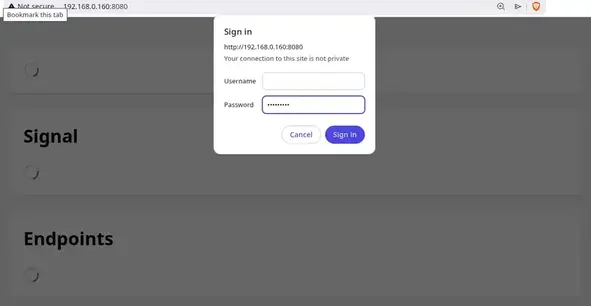
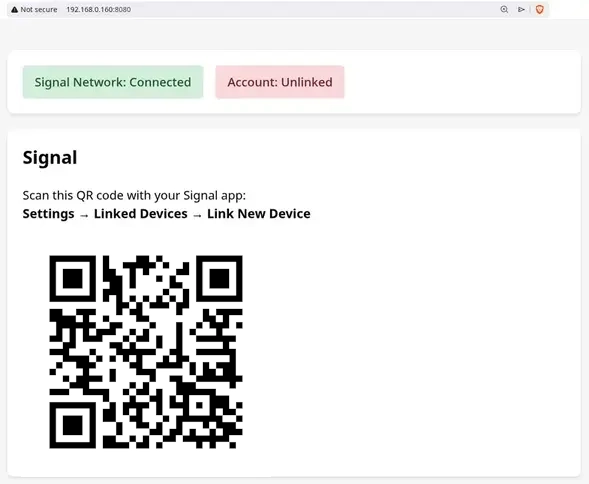
Visit http://localhost:8080 and link your Signal account (one-time setup):
1. Authenticate with your API_KEY
2. Scan the QR code from your Signal app
Go to Settings → Linked Devices → Link New Device in Signal.
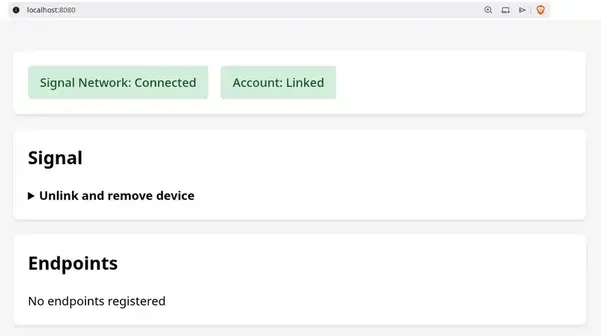
3. Verify the setup
Once linked, you'll see the status dashboard:
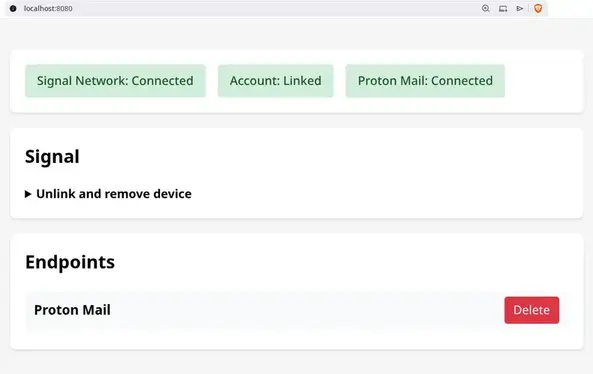
With optional Proton Mail integration:
Development
For local development, install Go and signal-cli:
git clone https://github.com/lone-cloud/prism.git
cd prism

# Install development tools and signal-cli
make install-tools

# Run locally
make dev
Then build and run with docker-compose.dev.yml:
docker compose --profile protonmail -f docker-compose.dev.yml up -d
or just the proton-bridge:
docker compose -f docker-compose.dev.yml up protonmail-bridge
Real-World Examples
Proton Mail Notifications
Receive Signal notifications when new emails arrive in your Proton Mail inbox.
Prism monitors a Proton Mail account via the local bridge and forwards email alerts through Signal. This relies on the same technology that a third-party email client like Thunderbird would be using to integrate with Proton Mail.
Home Assistant Alerts
Add a rest notification configuration (eg. add to configuration.yaml) to Home Assistant like:
notify:
  - platform: rest
    name: Prism
    resource: "http://<Your Prism server network IP>/Home Assistant"
    method: POST
    headers:
      Authorization: !secret prism_api_key
Note how Home Assistant is also a self-hosted server. As such, it is advisable to turn on ALLOW_INSECURE_HTTP environment variable for Prism and to refer to it by its LAN IP address.
Add your API_KEY to your secrets.yaml:
prism_api_key: "Bearer YOUR_API_KEY_HERE"
Reboot your Home Assistant system and you'll then be able to send Signal notifications to yourself by using this notify prism action.
Monitoring
The health of the system can be viewed in the same admin UI used for linking Signal. Prism uses basic access authentication - provide your API_KEY as the password (username can be anything).
For API-based monitoring, call /api/health which returns JSON:
{"uptime":"3s","signal":{"daemon":"running","linked":true},"protonMail":"connected"}
Architecture
Prism consists of two services that MUST run together on the same machine:
- prism (Go): Receives webhooks, sends Signal messages via signal-cli. Optional: monitors Proton Mail IMAP
- protonmail-bridge (Official Proton, optional): Decrypts Proton Mail emails, runs local IMAP server
All services communicate over a private Docker network with no external exposure except Signal protocol. Separating these services across multiple machines would expose plaintext IMAP traffic and compromise security.